
LinkedIn profile collector
Collects every person from a LinkedIn people search into a list you can download as CSV or JSON. I use it to find founders in stealth mode in my network, then give the file to Claude to sort and prioritise.
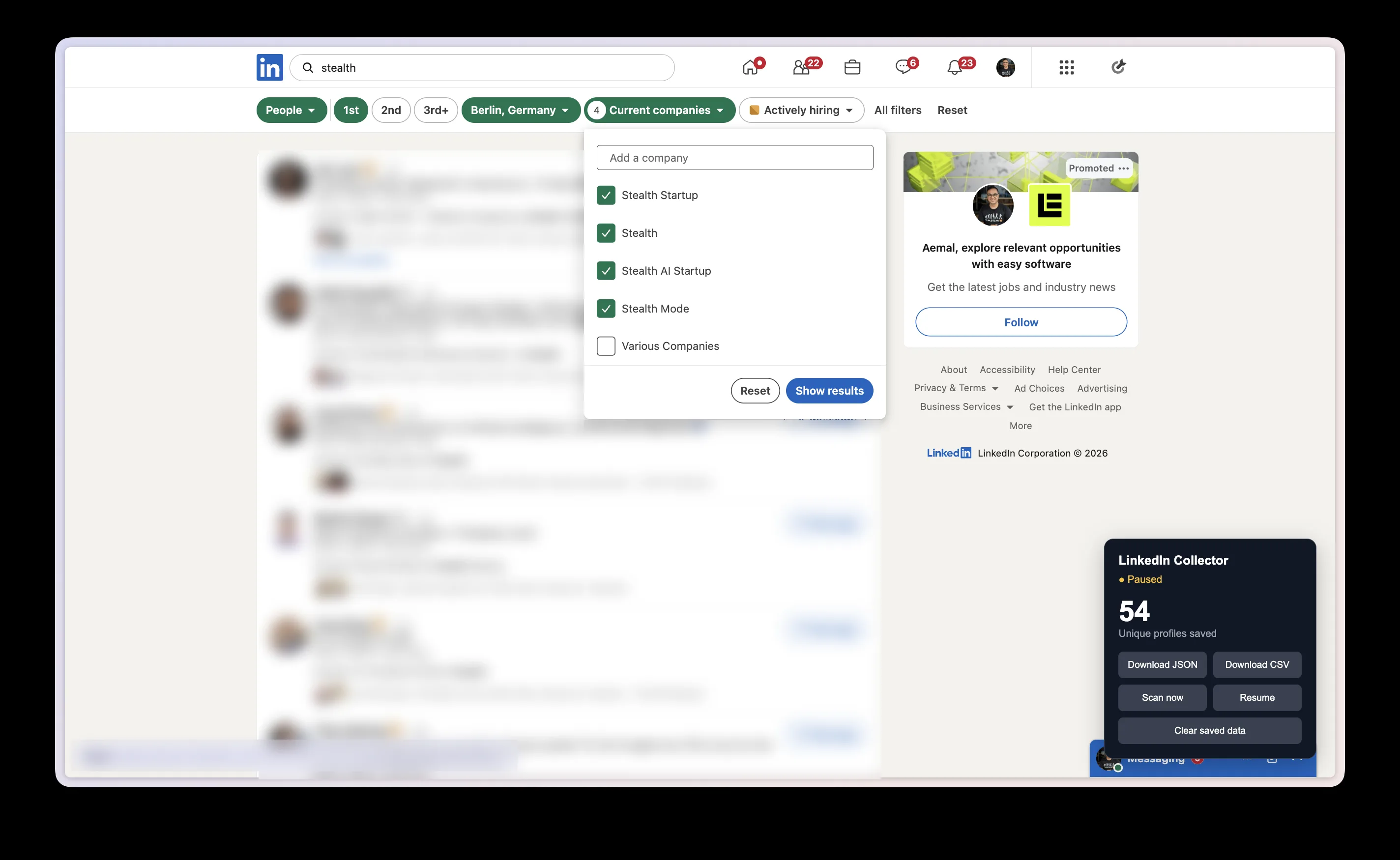
How to use it.
- Open a LinkedIn people search
Search for something like "stealth", pick People, then add filters: 1st connections, a location like Berlin, and Current companies such as Stealth Startup, Stealth, Stealth AI Startup and Stealth Mode.
- Open the console
Right click anywhere on the page and choose Inspect, then open the Console tab. On a Mac the shortcut is Cmd + Option + J.
- Copy the script
Click Copy on the script below. The first time, Chrome may ask you to type "allow pasting" in the console. Type it and press Enter.
- Paste it in the console and press Enter
The script adds a small dark panel called LinkedIn Collector to the bottom right of the LinkedIn page. It starts collecting every profile on the page right away, and the counter shows how many it has saved.
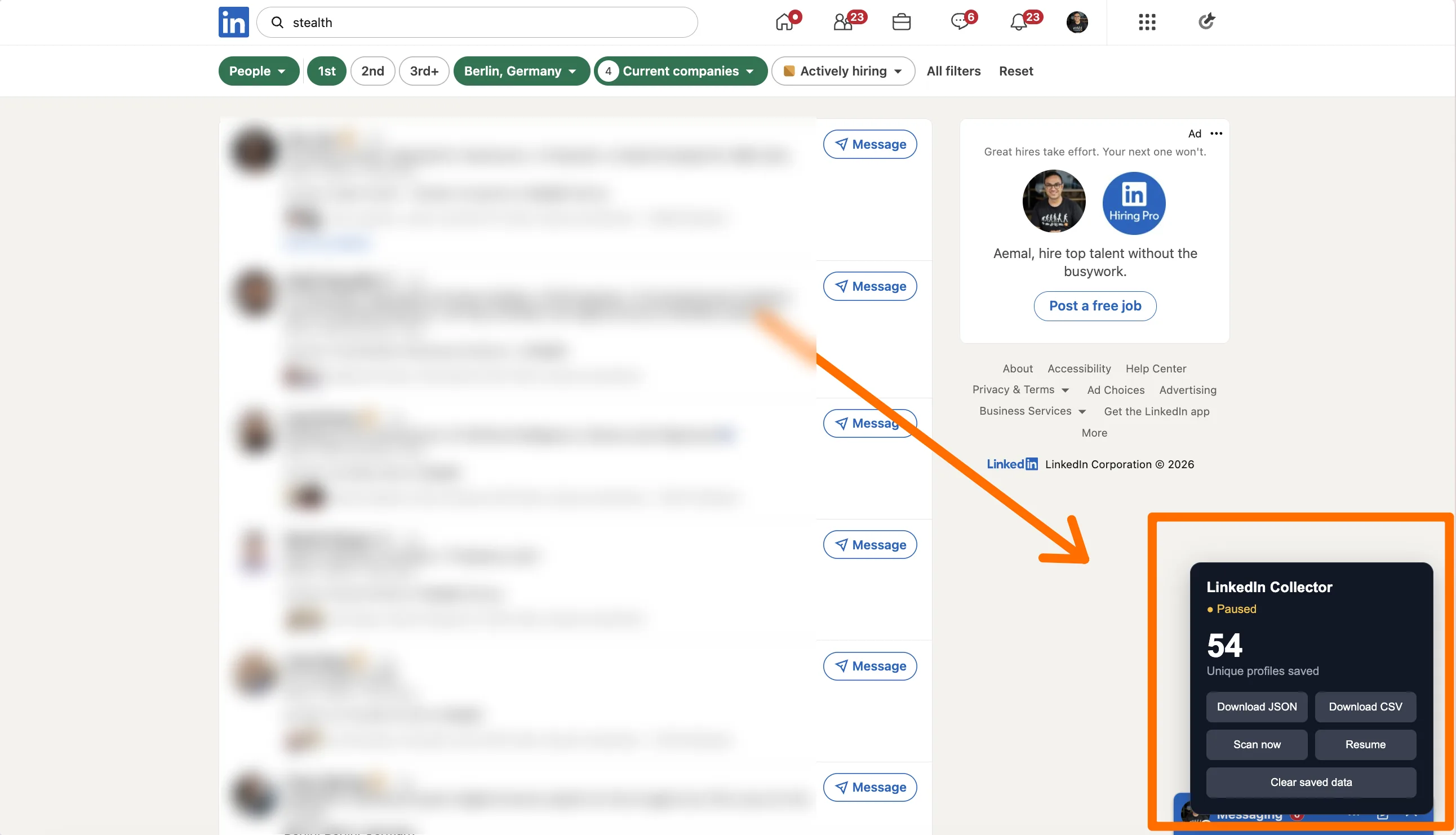
After pasting, the LinkedIn Collector panel appears at the bottom right. - Go through the pages
Scroll down and click Next. The counter goes up on every page. The data is kept in your browser, so you can even reload the page.
- Keep only people who are in stealth now
LinkedIn's keyword search also finds people who were in stealth in a past job. Leave "Download only current stealth" ticked in the panel, and the download only includes people whose current role, company or headline says stealth. The green line in the panel shows how many that is. Every row also gets a keyword_status column: current, past or no match.
- Download
Click Download CSV for a spreadsheet or Download JSON for tools and AI. To look for something else, like founder or freelance, change KEYWORD at the top of the script.
(() => {
    const STORAGE_KEY = "linkedin_profiles_v1";
    const PANEL_ID = "linkedin-collector-panel";
    const SETTINGS_KEY = "linkedin_profiles_settings_v1";

    // The word to look for in someone's CURRENT role, company or headline.
    // Change it to "founder", "freelance", etc. for other searches.
    const KEYWORD = "stealth";
    const keywordRegex = new RegExp(`\\b${KEYWORD}\\b`, "i");

    // When on, downloads only include people whose CURRENT role matches
    // KEYWORD. LinkedIn keyword search also matches past jobs, so without
    // this you also get people who were in stealth years ago.
    let onlyCurrent = JSON.parse(
        localStorage.getItem(SETTINGS_KEY) || '{"onlyCurrent": true}'
    ).onlyCurrent;

    // Stop previous instance if already running
    window.LinkedInCollector?.stop();

    let profiles = new Map(
        JSON.parse(localStorage.getItem(STORAGE_KEY) || "[]")
            .map(p => [p.linkedin_url, p])
    );

    const clean = value =>
        (value || "").replace(/\s+/g, " ").trim();

    const getText = element =>
        clean(element?.textContent);

    const normalizeURL = href => {
        try {
            const url = new URL(href, location.origin);

            if (!/(^|\.)linkedin\.com$/.test(url.hostname)) {
                return null;
            }

            if (!/^\/in\/[^/]+\/?$/.test(url.pathname)) {
                return null;
            }

            return "https://www.linkedin.com" +
                url.pathname.replace(/\/+$/, "") + "/";
        } catch {
            return null;
        }
    };

    const save = () => {
        localStorage.setItem(
            STORAGE_KEY,
            JSON.stringify([...profiles.values()])
        );
    };

    // Find the profile card surrounding the main profile link
    function findCard(link) {
        let node = link.parentElement;

        while (node && node !== document.body) {
            const snippet = node.querySelector(
                '[id^="SearchResultssnippet_"]'
            );

            const action = node.querySelector(
                '[id^="SearchResults"]'
            );

            if (snippet || action) {
                return node;
            }

            node = node.parentElement;
        }

        return null;
    }

    function collect() {
        let added = 0;
        let updated = 0;

        // Main profile links, excluding mutual connection links
        const links = document.querySelectorAll(
            'p > a[href*="/in/"]'
        );

        links.forEach(link => {
            const linkedin_url = normalizeURL(link.href);
            if (!linkedin_url) return;

            const name = getText(link);
            if (!name) return;

            const card = findCard(link);
            if (!card) return;

            const nameRow = link.closest("p");
            const infoBlock = nameRow?.parentElement;

            if (!infoBlock) return;

            // Extract headline and location from adjacent rows
            const infoRows = [...infoBlock.children]
                .filter(el => el !== nameRow)
                .map(getText)
                .filter(Boolean);

            const connection = (
                getText(nameRow).match(
                    /(?:•|·)\s*(1st|2nd|3rd\+?|3rd)/i
                ) || []
            )[1] || "";

            const verified = !!link.querySelector(
                '[aria-label="Verified"]'
            );

            const snippet = getText(
                card.querySelector(
                    '[id^="SearchResultssnippet_"]'
                )
            );

            // "current": the snippet says "Current: ... Stealth" or the
            // headline mentions it. "past": the match is only in a past job.
            const headline = infoRows[0] || "";
            let keyword_status = "no match";
            if (/^current\s*:/i.test(snippet) && keywordRegex.test(snippet)) {
                keyword_status = "current";
            } else if (keywordRegex.test(headline)) {
                keyword_status = "current";
            } else if (/^past\s*:/i.test(snippet) && keywordRegex.test(snippet)) {
                keyword_status = "past";
            }

            const image = card.querySelector(
                'figure img[src*="licdn.com"]'
            );

            const mutualLinks = [...card.querySelectorAll(
                'a[href*="/in/"]'
            )].filter(a => {
                const url = normalizeURL(a.href);
                return url && url !== linkedin_url;
            });

            const mutualConnections = [
                ...new Map(
                    mutualLinks.map(a => [
                        normalizeURL(a.href),
                        {
                            name: getText(a),
                            linkedin_url: normalizeURL(a.href)
                        }
                    ])
                ).values()
            ];

            const mutualText = getText(
                card.querySelector(
                    'a[href*="SHARED_CONNECTIONS"]'
                )
            );

            const otherMutualCount = mutualText.match(/\d+/);

            const resultId = card.querySelector(
                '[id^="SearchResults"]:not([id^="SearchResultssnippet_"])'
            )?.id.replace(/^SearchResults/, "") || "";

            const previous = profiles.get(linkedin_url);
            const now = new Date().toISOString();

            const record = {
                name,
                linkedin_url,
                headline,
                location: infoRows[1] || "",
                connection_degree: connection,
                verified,
                snippet,
                keyword_status,
                profile_id: resultId,
                profile_image_url: image?.src || "",
                mutual_connections: mutualConnections,
                other_mutual_connections_count:
                    otherMutualCount
                        ? Number(otherMutualCount[0])
                        : 0,
                source_url: location.href,
                first_collected_at:
                    previous?.first_collected_at || now
            };

            // Preserve previously collected non-empty values
            if (previous) {
                Object.entries(record).forEach(([key, value]) => {
                    if (
                        value === "" ||
                        (Array.isArray(value) && !value.length)
                    ) {
                        record[key] = previous[key] ?? value;
                    }
                });
            }

            if (!previous) {
                record.last_updated_at = now;
                profiles.set(linkedin_url, record);
                added++;
            } else {
                const { last_updated_at, ...oldData } = previous;

                if (
                    JSON.stringify(oldData) !==
                    JSON.stringify(record)
                ) {
                    record.last_updated_at = now;
                    profiles.set(linkedin_url, record);
                    updated++;
                }
            }
        });

        if (added || updated) {
            try {
                save();
            } catch (error) {
                console.error("Unable to save profiles:", error);
            }

            console.log(
                `[LinkedIn Collector] +${added} new, ` +
                `${updated} updated, ${profiles.size} total`
            );
        }

        updatePanel();

        return [...profiles.values()];
    }

    // Download helper
    function download(content, filename, type) {
        const blob = new Blob([content], { type });
        const url = URL.createObjectURL(blob);
        const a = document.createElement("a");

        a.href = url;
        a.download = filename;
        document.body.appendChild(a);
        a.click();
        a.remove();

        setTimeout(() => URL.revokeObjectURL(url), 1000);
    }

    const exportList = () =>
        [...profiles.values()].filter(p =>
            !onlyCurrent || p.keyword_status === "current"
        );

    const timestamp = () =>
        new Date().toISOString().replace(/[:.]/g, "-");

    function downloadJSON() {
        collect();

        download(
            JSON.stringify(exportList(), null, 2),
            `linkedin_profiles_${timestamp()}.json`,
            "application/json"
        );
    }

    function downloadCSV() {
        collect();

        const fields = [
            "name",
            "linkedin_url",
            "headline",
            "location",
            "connection_degree",
            "verified",
            "snippet",
            "keyword_status",
            "profile_id",
            "profile_image_url",
            "mutual_connections",
            "other_mutual_connections_count",
            "source_url",
            "first_collected_at",
            "last_updated_at"
        ];

        const escapeCSV = value => {
            let text = typeof value === "object" && value !== null
                ? JSON.stringify(value)
                : String(value ?? "");

            // Prevent spreadsheet formula injection
            if (/^[=+\-@\t\r]/.test(text)) {
                text = "'" + text;
            }

            return '"' + text.replace(/"/g, '""') + '"';
        };

        const rows = exportList().map(profile =>
            fields.map(field =>
                escapeCSV(profile[field])
            ).join(",")
        );

        const csv = [
            fields.join(","),
            ...rows
        ].join("\r\n");

        download(
            "" + csv,
            `linkedin_profiles_${timestamp()}.csv`,
            "text/csv;charset=utf-8"
        );
    }

    // Floating control panel
    document.getElementById(PANEL_ID)?.remove();

    const panel = document.createElement("div");
    panel.id = PANEL_ID;

    panel.style.cssText = `
        position: fixed;
        bottom: 24px;
        right: 24px;
        width: 270px;
        padding: 18px;
        background: #111827;
        color: #ffffff;
        border: 1px solid #374151;
        border-radius: 12px;
        box-shadow: 0 8px 30px #0004;
        z-index: 2147483647;
        font: 13px Arial, sans-serif;
    `;

    // Build the panel with DOM methods, not innerHTML: some LinkedIn pages
    // use Trusted Types, which turns innerHTML into plain text.
    const el = (tag, style = "", text = "") => {
        const node = document.createElement(tag);
        if (style) node.style.cssText = style;
        if (text) node.textContent = text;
        return node;
    };

    const status = el("div", "color:#4ade80;margin-top:8px", "● Collecting");
    status.id = "lic-status";

    const countEl = el("div", "font-size:36px;font-weight:bold;margin-top:12px", "0");
    countEl.id = "lic-count";

    const currentEl = el("div", "color:#4ade80;margin:4px 0 12px", `0 currently in ${KEYWORD}`);
    currentEl.id = "lic-current";

    const toggleLabel = el("label", "display:flex;gap:8px;align-items:center;margin-bottom:14px;cursor:pointer");
    const checkbox = el("input");
    checkbox.type = "checkbox";
    checkbox.id = "lic-only-current";
    checkbox.checked = onlyCurrent;
    toggleLabel.append(checkbox, document.createTextNode(`Download only current "${KEYWORD}"`));

    const grid = el("div", "display:grid;grid-template-columns:1fr 1fr;gap:8px");
    [
        ["json", "Download JSON"],
        ["csv", "Download CSV"],
        ["scan", "Scan now"],
        ["toggle", "Pause"],
        ["clear", "Clear saved data"],
    ].forEach(([action, label]) => {
        const button = el(
            "button",
            "background:#374151;color:white;border:0;padding:10px 6px;" +
            "border-radius:6px;cursor:pointer;font-size:12px;" +
            (action === "clear" ? "grid-column:span 2;" : ""),
            label
        );
        button.dataset.action = action;
        grid.append(button);
    });

    panel.append(
        el("div", "font-size:16px;font-weight:bold", "LinkedIn Collector"),
        status,
        countEl,
        el("div", "color:#9ca3af", "Unique profiles saved"),
        currentEl,
        toggleLabel,
        grid
    );

    document.body.appendChild(panel);

    let running = true;
    let timer;

    function updatePanel() {
        const count = panel.querySelector("#lic-count");
        const current = [...profiles.values()]
            .filter(p => p.keyword_status === "current").length;

        panel.querySelector("#lic-current").textContent =
            `${current} currently in ${KEYWORD}`;

        if (count.textContent !== String(profiles.size)) {
            count.textContent = profiles.size;
        }
    }

    function scheduleScan() {
        if (!running) return;
        clearTimeout(timer);
        timer = setTimeout(collect, 500);
    }

    const observer = new MutationObserver(mutations => {
        const relevant = mutations.some(
            mutation => !panel.contains(mutation.target)
        );

        if (relevant) scheduleScan();
    });

    function start() {
        running = true;

        observer.observe(document.body, {
            childList: true,
            subtree: true,
            characterData: true,
            attributes: true,
            attributeFilter: ["href", "src"]
        });

        panel.querySelector("#lic-status").textContent =
            "● Collecting";

        panel.querySelector("#lic-status").style.color =
            "#4ade80";

        panel.querySelector('[data-action="toggle"]')
            .textContent = "Pause";

        collect();
    }

    function pause() {
        running = false;
        observer.disconnect();
        clearTimeout(timer);

        panel.querySelector("#lic-status").textContent =
            "● Paused";

        panel.querySelector("#lic-status").style.color =
            "#fbbf24";

        panel.querySelector('[data-action="toggle"]')
            .textContent = "Resume";
    }

    function clear() {
        if (!confirm(
            `Delete all ${profiles.size} saved profiles?`
        )) return;

        pause();
        profiles.clear();
        localStorage.removeItem(STORAGE_KEY);
        updatePanel();
    }

    panel.querySelector("#lic-only-current")
        .addEventListener("change", event => {
            onlyCurrent = event.target.checked;
            localStorage.setItem(
                SETTINGS_KEY,
                JSON.stringify({ onlyCurrent })
            );
        });

    panel.addEventListener("click", event => {
        const action = event.target.dataset.action;

        switch (action) {
            case "json":
                downloadJSON();
                break;
            case "csv":
                downloadCSV();
                break;
            case "scan":
                collect();
                break;
            case "toggle":
                running ? pause() : start();
                break;
            case "clear":
                clear();
                break;
        }
    });

    // Public console API
    window.LinkedInCollector = {
        collect,
        downloadJSON,
        downloadCSV,
        pause,
        resume: start,
        clear,
        count: () => profiles.size,
        data: () => [...profiles.values()],
        stop: () => {
            running = false;
            observer.disconnect();
            clearTimeout(timer);
            panel.remove();
        }
    };

    start();

    console.log(
        "[LinkedIn Collector] Started successfully.",
        "\nSaved profiles:", profiles.size,
        "\nAPI: window.LinkedInCollector"
    );
})();
Use it for your own network and keep the numbers human. LinkedIn's terms don't allow automated scraping, and sending lots of messages fast can get your account restricted. A safe pace is around 30 - 50 personal messages a day.
When LinkedIn changes, make your own
LinkedIn changes its page often, and then scripts like this stop working. You don't need me to fix it. Copy one result card and let an LLM write a new script for you. This works for any website with a repeating list.
- Open Inspect
Right click on one result card and choose Inspect. DevTools opens next to the page.
- Use the element picker
Click the arrow icon at the top left of DevTools ("Select an element in the page to inspect it", Cmd + Shift + C) and click on the outer edge of one result card, so the whole card is highlighted.
- Copy outer HTML
In the Elements panel, right click the highlighted line and choose Copy, then Copy outerHTML.
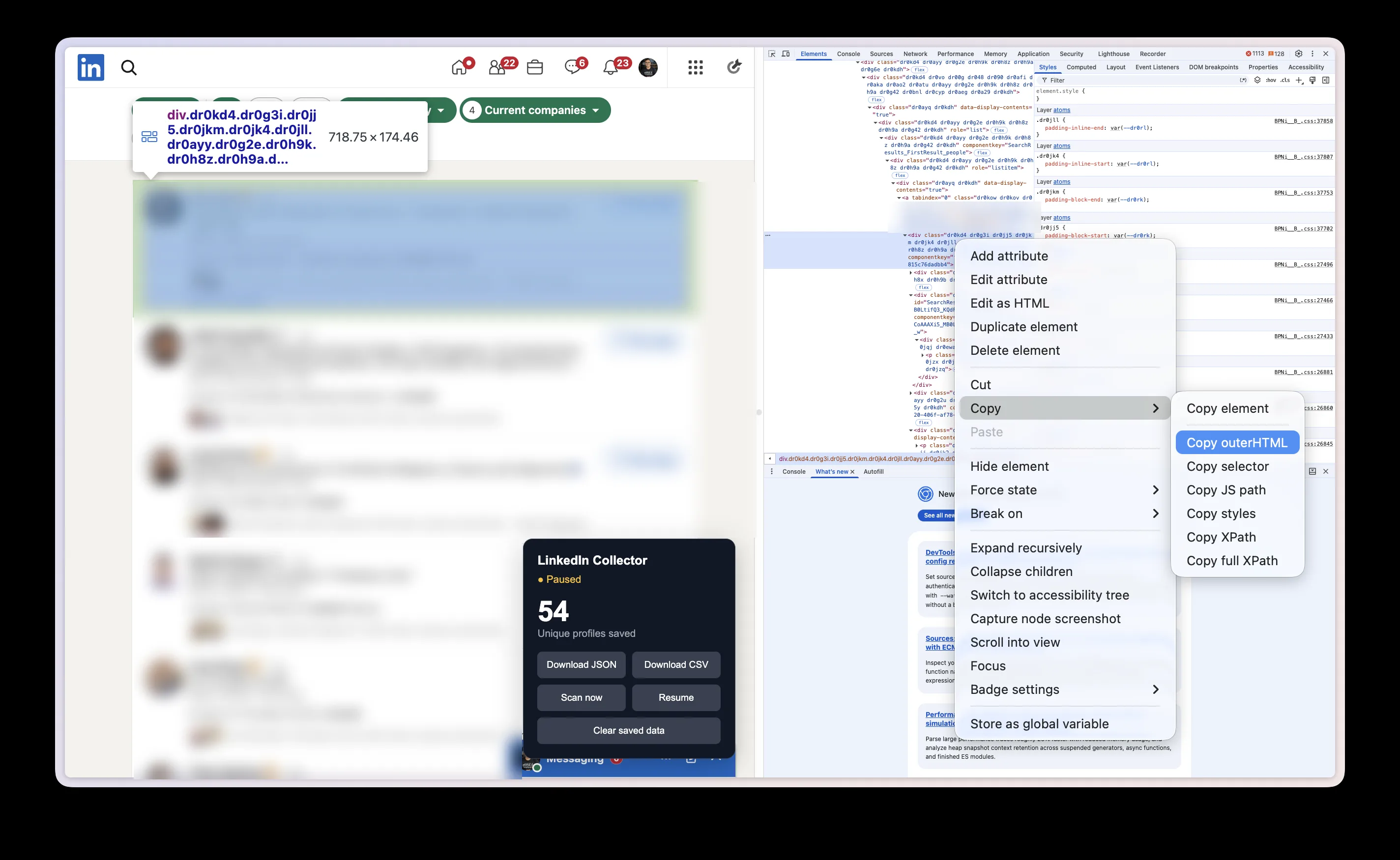
One result card selected, then right click, Copy, Copy outerHTML. - Ask an LLM
Open Claude, ChatGPT or Gemini, paste the prompt below, and paste the copied HTML where it says so.
- Test it
Paste the code you get back into the console. If something is missing, tell the LLM what's wrong and paste a fresh outer HTML.
The prompt
Write a self-invoking JavaScript function (IIFE) that I can paste into the Chrome DevTools console on a page.

Below this prompt I paste the outerHTML of ONE repeating element from that page (for example one person card in a LinkedIn search result). Use it to work out the structure, then:

1. Find every element on the page that repeats this structure.
2. From each one, extract the LinkedIn profile URL (most important, normalised to https://www.linkedin.com/in/<handle>/ with no query string) and use it as the unique key. Also extract anything else useful you can find: name, headline, location, connection degree, current role/company snippet, mutual connections, profile image URL.
3. Store everything in localStorage, de-duplicated by URL, so data survives page reloads and I can collect across many result pages.
4. Watch the page with a MutationObserver so new results are collected automatically when I scroll or go to the next page.
5. Show a small floating panel with the number of saved profiles and buttons: Download JSON, Download CSV, Scan now, Pause/Resume, Clear saved data (with a confirm).
6. Make the CSV safe to open in Excel or Google Sheets: UTF-8 with BOM, quote every value, and prefix values starting with = + - @ to prevent formula injection.
7. If I paste the script twice, stop the old instance first. Expose a small API on window (collect, downloadJSON, downloadCSV, pause, resume, clear, data).
8. Don't rely on generated CSS class names (they change often). Prefer stable things like href patterns, id prefixes and the page structure.
9. Add a keyword_status field (current, past or no match) for my keyword, based on the "Current:" / "Past:" line and the headline, and a checkbox in the panel to download only people where the keyword is in their CURRENT role. My keyword is: [YOUR KEYWORD, e.g. stealth]
10. Don't click, scroll or send anything on my behalf. Only read what is already on the screen.

Return only the code, with short comments.

Here is the element:
[PASTE THE OUTER HTML HERE]© Copyright All Rights Reserved
This website is made by Samantha.